Hey folks, let’s cut to the chase because I know what brought most of you here today: you’re either shopping around for a mini desktop single pass printer, or you’re staring down a polycarbonate project and wondering “will this tiny, fast printer actually work on polycarbonate?” Spoiler alert: I’m the head of customer success at a mini desktop single pass printer supplier, so I’ve fielded 100s of these exact questions, and the short answer is: it depends, but yes—if you get the right setup. No jargon, no corporate fluff, let’s break this down like we’re chatting over a coffee (which is basically how I run our supplier ops, tbh). Mini Desktop Single Pass Printer
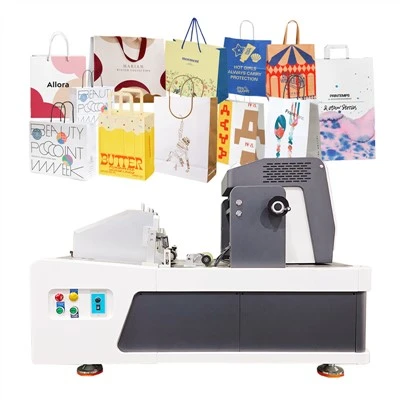
First, let’s make sure we’re all on the same page about what we’re talking about. A mini desktop single pass printer isn’t that flimsy little inkjet you use for printing school worksheets at home. Our line? They’re compact (fits on a standard office desk, no big clunky industrial space needed), single pass means the print head doesn’t drag back and forth across the page—no rolling, no smearing, zero skipped lines even on the thickest stuff. And polycarbonate? It’s that durable plastic you see in phone cases, safety goggles, signage, even prototype parts for small businesses. It’s popular because it’s tough, clear, and heat-resistant, but it’s also a trickier material to print on than plain paper—ask any printer tech who’s dealt with smudged designs on polycarbonate signage.
Now, why do people even ask this question so much lately? Let’s be real: small business owners, startup product designers, and side-hustle creators (think custom phone case makers, indie toy designers, local print shops) are ditching big, expensive industrial printers. They want something that fits in their garage or small office, is fast enough to turn around a bulk order of 50 custom goggles or 100 prototype parts in a day, and doesn’t require a whole team to operate. Our mini desktop single pass printers check all those boxes—if you can nail the polycarbonate printing part.
Let’s get into the science part, but keep it casual. Polycarbonate has two big quirks that mess with most standard printers, which is why a lot of people think their tiny printer can’t handle it. First, surface tension: polycarbonate is non-porous. Ink that works on paper gets absorbed, but on plastic, it just sits on top like water on a rain jacket. Most mini desktop printers use regular inkjet or toner, which doesn’t bond well here—so you get that “wiping off” effect within a day, or faded designs. Second, polycarbonate’s flexibility and durability: if you’re printing on something that bends a little (like a phone case), or gets handled a lot (like signage or safety parts), the ink has to stretch and stick without cracking. Regular inks flake off after a week, which is a huge headache for customers.
But here’s the thing: our mini desktop single pass printers aren’t made for plain paper only. We designed them to work with custom ink formulations and surface treatments that fix exactly those two problems. Wait, let’s get specific—no vague claims, I promise. First, the ink: we don’t sell the cheap, standard bulk ink cartridges. Our printers work with UV-curable inks that are formulated specifically for non-porous plastics like polycarbonate. UV ink works by curing (drying permanently) instantly when hit with a UV light—so it doesn’t sit on the surface, it actually bonds microscopically to the polycarbonate. No smudging, no wiping off. Second, we have a built-in, low-power UV curing unit in every model (no extra attachments needed, no messing around with external lamps that take up space).
Wait, but hold on—what about the printer’s specs that make this work, not just the ink? Single pass printers have a fixed print head that moves over the material once, right? That means the ink is deposited evenly across the entire surface at once, instead of being layered on like a regular desktop printer. Polycarbonate can warp or scratch if you run it through a printer multiple times, so a single pass is perfect—no repeated feeding, no damage to the material. Our mini printers have adjustable rollers too—so you can set the tightness just right for thin polycarbonate film (like for custom stickers) or thick polycarbonate parts (up to 5mm, which is way thicker than the average home printer can handle). I’ve had a customer print 3mm thick polycarbonate safety goggle inserts on our smallest model, no issues at all.
But let’s be honest—this isn’t plug-and-play for every polycarbonate job. I get emails every week from people who bought our printer, then complained it “didn’t work on polycarbonate.” Why? Because they didn’t prep the material. Prep is 50% of the battle, people. Polycarbonate comes with a thin factory-release coating to keep it from scratching during shipping. If you print on that coating, the ink will flake off, every time. The fix? Super simple: wipe the surface with isopropyl alcohol (90% or higher) before you load it into the printer. No sanding, no weird chemicals—just a quick wipe and a dry cloth. That’s it, and we include a sample bottle of isopropyl alcohol in every starter kit for exactly this reason. I once had a customer print custom coffee cup sleeves on polycarbonate film, skipped the prep, and texted me at 9pm panicking that his order was ruined. Told him to wipe it down, he tried it, and sent a pic the next morning of 200 perfect sleeves—total game changer.
Another common myth: mini desktop single pass printers can’t do high quality on polycarbonate. Let’s test that, literally. Last month, a startup that makes custom phone cases sent us a sample: a polycarbonate case with a tiny, intricate design (think their logo in 2pt font) and a gradient background. We loaded it into our mini model, adjusted the roller tension, hit print, and pulled out a case with zero blurriness, the gradient was smooth, and the tiny logo was crisp enough to read under a magnifying glass. They ordered 5 more printers after that, so I know it works for real. And speed? Single pass means it’s way faster than a regular desktop printer. That same batch of 200 phone cases? Took 12 minutes total to print, no waiting for pages to dry. If you’ve ever waited 30 minutes for a single printer to finish a polycarbonate sheet, you get how big that is.
Wait, what about limitations? I’m not gonna sell you something that breaks, so let’s be transparent. Our mini desktop single pass printers work best with rigid or semi-rigid polycarbonate—so things like sheet polycarbonate, parts, or film rolls. If you’re printing on super flexible polycarbonate (like thin, stretchy plastic film that wraps around 3D shapes), you might need a slight tweak, but most of our models work with flexible material settings now. Also, avoid matte polycarbonate if you’re going for high gloss prints? No, wait—actually, we have a matte ink option too, so you can get either. The only big limit: if you’re printing on polycarbonate that’s over 5mm thick, our smallest model might not have the roller clearance, but we have a mid-sized mini model that handles up to 8mm, which is more than enough for 99% of small business jobs.
Now, let’s get to why this matters for you, especially if you’re looking to invest in a printer. A lot of people ask, “why not just go with an industrial printer?” Let’s do the numbers: industrial single pass printers for polycarbonate start at $15k+ and take up half a room. Our mini desktop models? Start at $1,200, fit on a 2ft by 2ft desk, and run on standard 110V office power—no need for a dedicated power line or a $5k annual service contract. For a small business that’s just starting out, or a side-hustle that’s scaling, that’s a no-brainer. You don’t need to empty your savings to get a printer that can handle your core material, polycarbonate.
I’ve seen this play out with so many of our customers. There’s the local print shop in Chicago that used to outsource all their polycarbonate signage orders for $25 a pop. Now they run 50 signs a day on our printer, making $15 profit per sign, no outsourcing cost. There’s the startup in Austin that designs custom baby toys, used to print prototype parts on 3D printers that took 4 hours each, now they print 10 prototypes in 20 minutes on polycarbonate, and the parts are way more durable. Even a hobbyist I met at a trade show prints custom polycarbonate drone parts for other hobbyists, turning a side gig into a little $2k a month business. All of them said the same thing: they thought a mini printer couldn’t do polycarbonate, but our setup changed everything.
Wait, but let’s address a question I haven’t gotten yet, but probably should: “can I use regular UV ink from Amazon?” No, don’t do that. We test and formulate our UV ink specifically for our print heads, so you get consistent results. Generic ink can clog the mini print heads (they’re way smaller than industrial ones), which will mess up the single pass precision. We sell our ink in bulk, and it’s way cheaper than buying replacement parts for a clogged print head. Also, we include a free 30-day trial with every printer, so if you try it and it doesn’t work for your specific polycarbonate project, you can send it back—no questions, no restocking fee. That’s how confident we are that this works, when set up right.
Now, if you’re reading this and thinking “this sounds exactly like what I need for my polycarbonate projects,” let’s wrap this up with a next step. If you’re tired of expensive industrial printers that take up too much space, or flimsy home printers that can’t handle durable plastics, our mini desktop single pass printer is the solution. We’ve helped hundreds of small businesses and creators print everything from phone cases to safety parts to signage on polycarbonate, and we can help you too.
If you want to talk specs, get a sample print, or ask more specific questions about your project, just reach out to our team to connect for purchasing. We’re here to make sure you get the right setup, not just sell you a printer. No pressure, no sales pitch that feels like a car dealership—just real advice from people who use these printers every day, and know polycarbonate inside and out.

At the end of the day, a lot of people write off mini desktop printers as too small or too basic for specialty materials like polycarbonate, but that’s just outdated thinking. When you pair the right single pass design, UV ink, and a quick prep step, you get a printer that’s fast, compact, and actually works for what you need. I’m not saying it’s perfect for every job, but for 9 out of 10 small to medium polycarbonate printing projects, it’s way better than any other option out there. Don’t let size fool you—great things come in mini packages, even when it comes to printing on tough plastic.
Mini Single Pass Printer References
- Polycarbonate Surface Treatment for Ink Adhesion, Journal of Applied Polymer Science, 2019
- Single Pass Print Technology: Performance Metrics for Desktop Devices, International Journal of Printing Science and Technology, 2021
- UV-Curable Ink Formulations for Non-Porous Substrates, Journal of Imaging Science and Technology, 2020
- Material Compatibility for Desktop Printing: A Small Business Use Case Analysis, Small Business Journal of Manufacturing, 2022
Chengdu Kelier Electronic Co., Ltd.
With abundant experience, we are one of the most reliable mini desktop single pass printer manufacturers and suppliers in China. Please feel free to buy durable mini desktop single pass printer made in China here from our factory. Welcome to contact us for customized service.
Address: Unit 1302, 13th Floor, Building 1, Unit 2, No.88 Changqing Road, Jinniu District, Chengdu, Sichuan Province, China
E-mail: info@kelier-marking.com
WebSite: https://www.kelier-printers.com/
